
Database explorer
The Database view is a webview tree drawn in IntelliJ's design language, which is what lets it show vendor marks, env dots and introspection badges the way Database Tools does. Introspection is lazy: a source connects and reads its catalogue the first time you expand it.
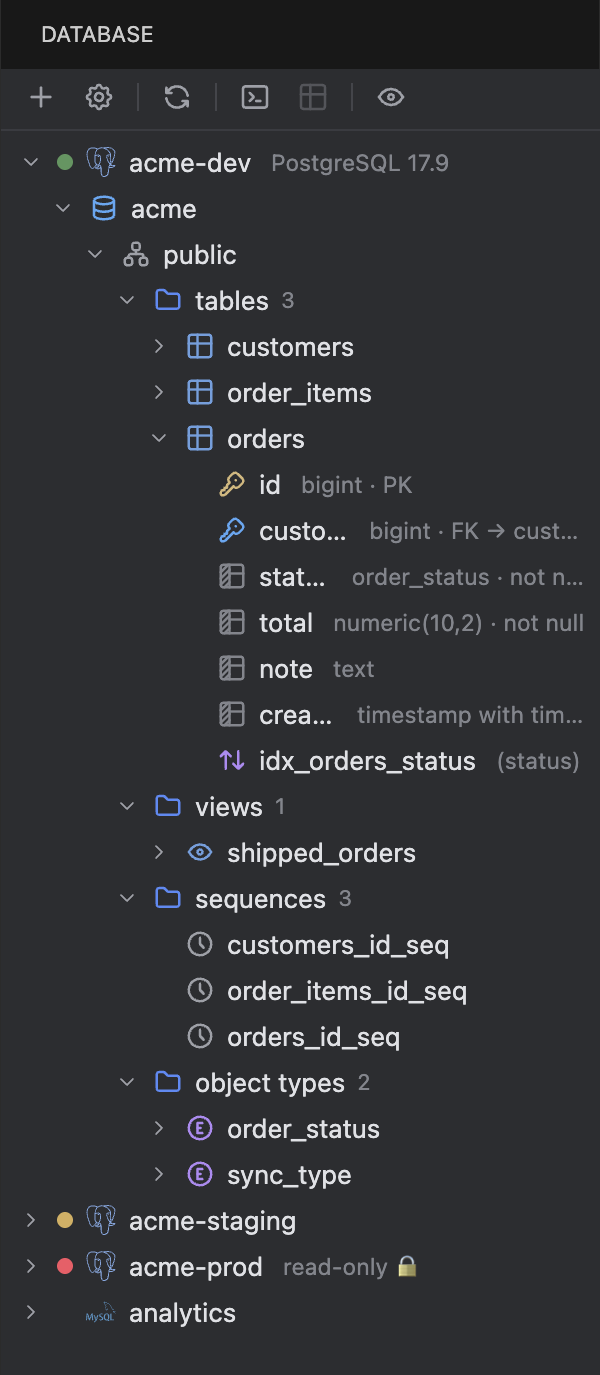
A PostgreSQL source expanded to its columns, with the key markers and type hints, and three other sources collapsed below it. The red dot and lock mark acme-prod as read-only.
What's in the tree
- Data sources, with the vendor mark and env colour dot.
- Schemas (PostgreSQL) or databases (MySQL). SQLite shows one schema.
- Tables with their columns, primary and foreign key markers, and indexes.
- Views, sequences, routines and enum types.
- Count badges on each group once it's introspected.
System schemas (pg_catalog, information_schema, mysql, sys and friends) are hidden by default. The eye button in the toolbar, or tablecloth.explorer.showSystemSchemas, shows them.
Toolbar
Left to right: New Data Source…, Data Source Properties…, Refresh, Query Console…, Open Table Data, Go to DDL, and Show/Hide System Schemas. Buttons act on the selected node.
Context menu
| Item | Does |
|---|---|
| Open Table Data | Opens the data editor on a table or view. Double-click does the same. |
| Query Console… | Opens a new console bound to the source and the selected schema. |
| Go to DDL | Opens the CREATE statement for a table, view, routine, sequence or enum type in a read-only SQL document. |
| Import Data from File… | Starts the import wizard against the selected table or schema. |
| Copy Name | Copies the object name. |
| Select Schema… | Chooses which schemas the source introspects. |
| Refresh | Re-introspects the node. With auto-sync off, this is the only time the tree changes. |
| Disconnect | Closes the source's sessions and collapses it. |
| Data Source Properties… / Duplicate / Remove | The dialog, a copy, or removal with confirmation. |
Go to Database Object
⌘⇧O (CtrlShiftO) opens a quick pick over every introspected source: tables, columns, routines and the rest. Picking one reveals it in the tree and opens the table or its DDL. The binding is active while the explorer, the Tablecloth panel, a console or a data editor has focus, so it doesn't fight the editor's own ⌘⇧O elsewhere.